Your go-to tab manager. Save and restore your browser sessions in one click.
Stop losing tabs every time you close Chrome. Tabrift lets you save named sessions and bring them back instantly — free forever.
Trusted by power users, developers, and researchers
Why Tabrift? Simple, powerful benefits.
Tabrift is the smart choice for anyone who lives in their browser.
Save anything instantly
Name and save your open tabs as a session in one click. Never lose a research stack again.
Free forever
Core features are completely free. No trial, no credit card, no expiration.
Lightning fast
Restore an entire session in under a second. Your tabs are back exactly as you left them.
Simple and clean
No clutter, no bloat. Just a clean panel that stays out of your way until you need it.
How it works. Install Tabrift and tame your tabs today.
Up and running in seconds — no setup, no account required.
1
Install Tabrift
Add Tabrift to Chrome in one click from the Chrome Web Store. No account needed to get started.
2
Save your tabs
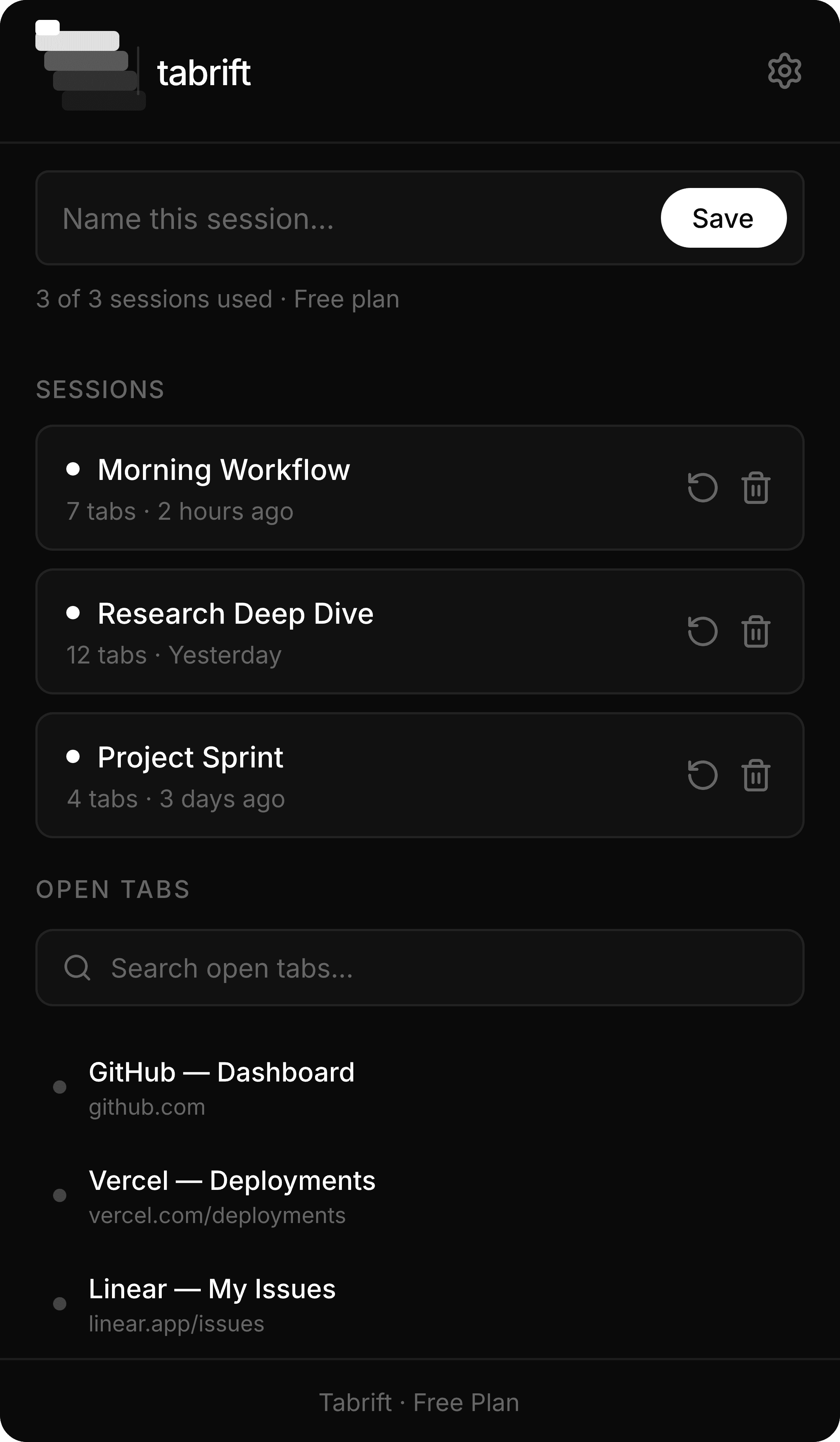
Click the Tabrift icon, give your session a name, and hit Save. All your open tabs are stored instantly.
3
Restore anytime
Come back later, click Restore on any saved session, and your tabs open back up exactly as they were.
4
Upgrade when ready
Need unlimited sessions or cross-device sync? Upgrade to Pro for $5/mo and unlock everything.
Everything you need to manage your tabs.
Simple features that solve real problems every browser user faces.
Save Sessions
Works on Any Site
Restore Sessions
Private & Secure
Tab Search
Auto-Save (Pro)
Session Names
Cloud Sync (Pro)
Duplicate Detection
Unlimited Sessions (Pro)
One-Click Restore
and more
Your tabs, always one click away.
Enjoy a dedicated Slack channel for real-time updates and collaboration. Plus, benefit from a 30-minute weekly call to review progress and discuss your needs.
Can I save my research tabs before I close Chrome?
Yes — name your session and save in 2 seconds.
Our plans.
We keep it simple.
Free
$0
/mo
Up to 3 saved sessions
Tab search
One-click restore
Local storage
No account required
Pro
$5
/mo
Add to Chrome — It's Free
Unlimited saved sessions
Auto-save on Chrome close
Cloud sync across devices
Priority support
Pause or cancel anytime
Still have questions?
We have more answers too.
Everything you need to know about Tabrift.
Your go-to tab manager. Save and restore your browser sessions in one click.
Stop losing tabs every time you close Chrome. Tabrift lets you save named sessions and bring them back instantly — free forever.
Trusted by power users, developers, and researchers
Why Tabrift? Simple, powerful benefits.
Tabrift is the smart choice for anyone who lives in their browser.
Save anything instantly
Name and save your open tabs as a session in one click. Never lose a research stack again.
Free forever
Core features are completely free. No trial, no credit card, no expiration.
Lightning fast
Restore an entire session in under a second. Your tabs are back exactly as you left them.
Simple and clean
No clutter, no bloat. Just a clean panel that stays out of your way until you need it.
How it works. Install Tabrift and tame your tabs today.
Up and running in seconds — no setup, no account required.
1
Install Tabrift
Add Tabrift to Chrome in one click from the Chrome Web Store. No account needed to get started.
2
Save your tabs
Click the Tabrift icon, give your session a name, and hit Save. All your open tabs are stored instantly.
3
Restore anytime
Come back later, click Restore on any saved session, and your tabs open back up exactly as they were.
4
Upgrade when ready
Need unlimited sessions or cross-device sync? Upgrade to Pro for $5/mo and unlock everything.
Everything you need to manage your tabs.
Simple features that solve real problems every browser user faces.
Save Sessions
Works on Any Site
Restore Sessions
Private & Secure
Tab Search
Auto-Save (Pro)
Session Names
Cloud Sync (Pro)
Duplicate Detection
Unlimited Sessions (Pro)
One-Click Restore
and more
Your tabs, always one click away.
Enjoy a dedicated Slack channel for real-time updates and collaboration. Plus, benefit from a 30-minute weekly call to review progress and discuss your needs.
Can I save my research tabs before I
close Chrome?
Yes — name your session and
save in 2 seconds.
Our plans.
We keep it simple.
Free
$0
/mo
Up to 3 saved sessions
Tab search
One-click restore
Local storage
No account required
Pro
$5
/mo
Add to Chrome — It's Free
Unlimited saved sessions
Auto-save on Chrome close
Cloud sync across devices
Priority support
Pause or cancel anytime
Still have questions?
We have more answers too.
Everything you need to know about Tabrift.
Your go-to tab manager. Save and restore your browser sessions in one click.
Stop losing tabs every time you close Chrome. Tabrift lets you save named sessions and bring them back instantly — free forever.
Trusted by power users, developers, and researchers
Why Tabrift? Simple, powerful benefits.
Tabrift is the smart choice for anyone who lives in their browser.
Save anything instantly
Name and save your open tabs as a session in one click. Never lose a research stack again.
Free forever
Core features are completely free. No trial, no credit card, no expiration.
Lightning fast
Restore an entire session in under a second. Your tabs are back exactly as you left them.
Simple and clean
No clutter, no bloat. Just a clean panel that stays out of your way until you need it.
How it works. Install Tabrift and tame your tabs today.
Up and running in seconds — no setup, no account required.
1
Install Tabrift
Add Tabrift to Chrome in one click from the Chrome Web Store. No account needed to get started.
2
Save your tabs
Click the Tabrift icon, give your session a name, and hit Save. All your open tabs are stored instantly.
3
Restore anytime
Come back later, click Restore on any saved session, and your tabs open back up exactly as they were.
4
Upgrade when ready
Need unlimited sessions or cross-device sync? Upgrade to Pro for $5/mo and unlock everything.
Everything you need to manage your tabs.
Simple features that solve real problems every browser user faces.
Save Sessions
Works on Any Site
Restore Sessions
Private & Secure
Tab Search
Auto-Save (Pro)
Session Names
Cloud Sync (Pro)
Duplicate Detection
Unlimited Sessions (Pro)
One-Click Restore
and more
Your tabs, always one click away.
Enjoy a dedicated Slack channel for real-time updates and collaboration. Plus, benefit from a 30-minute weekly call to review progress and discuss your needs.
Can I save my research tabs before I close Chrome?
Yes — name your session and save in 2 seconds.
Our plans.
We keep it simple.
Free
$0
/mo
Up to 3 saved sessions
Tab search
One-click restore
Local storage
No account required
Pro
$5
/mo
Add to Chrome — It's Free
Unlimited saved sessions
Auto-save on Chrome close
Cloud sync across devices
Priority support
Pause or cancel anytime
Still have questions?
We have more answers too.
Everything you need to know about Tabrift.